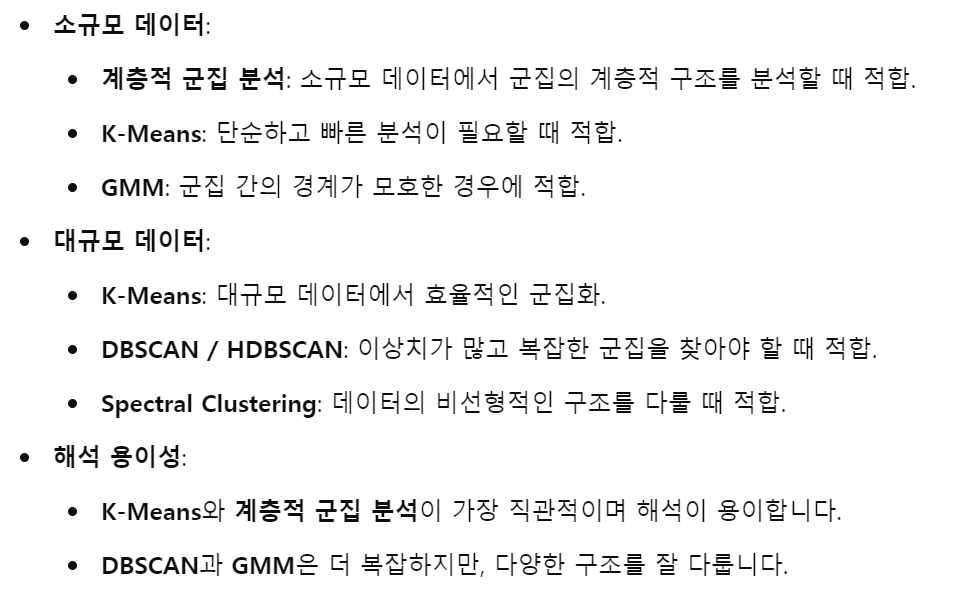
*알고리즘별 장단점 및 적합한 데이터

*계층적 군집분석 (p.336)
– n개의 군집으로 시작해 점차 군집의 개수를 줄여나가는 방법
– 군집의 거리를 계산하는 방법에 따라 사용하는 연결법이 달라짐
– 모든 연결법은 거리행렬을 통해 가까운 거리의 객체들 관계를 규명하고, 군집의 개수를 선택
→ 특이점이나 비정상적인 그룹을 발견하기도 쉽고, 클러스터 해석 용이
but, 대규모 데이터에는 적용할 수 없음
*최단 연결법
import pandas as pd
import numpy as np

from scipy.cluster.hierarchy import dendrogram, linkage, fcluster
from matplotlib import pyplot as plt

US = pd.read_csv('data/USArrests.csv')
US.columns = ['State', 'Murder', 'Assault', 'UrbanPop', 'Rape']
labelList = US.State.tolist()

# single: 최단, complete: 최장, average: 평균, centroid: 중심, ward: 와드
single = linkage(US.iloc[:, 1::], metric='euclidean', method='single')

plt.figure(figsize=(10,7))
dendrogram(single, orientation='top', labels=labelList, distance_sort='descending', color_threshold=25, show_leaf_counts=True)
plt.axhline(y=25, color='r', linewidth=1)
plt.show()
→ t 값이 25일 때, 6개 군집으로 나눌 수 있음
→ 각 군집의 개수가 비슷하지 않아 군집 해석에 어려울 수 있음 → 와드 연결법을 사용해보자
*와드 연결법
single = linkage(US.iloc[:, 1::], metric='euclidean', method='ward')

plt.figure(figsize=(10,7))
dendrogram(single, orientation='top', labels=labelList, distance_sort='descending', color_threshold=250, show_leaf_counts=True)
plt.axhline(y=250, color='r', linewidth=1)
plt.show()
→ t 값이 250일 때, 3개 군집으로 나눌 수 있으며, 각 군집 수가 비슷함

→ 1번 집단이 치안이 좋지 않은 도시의 집단이라고 볼 수 있음
→ 반대로 3번 집단은 치안이 좋은 지역이라고 판단할 수 있음
*비계층적 군집분석
– 랜덤하게 군집을 묶어가는 알고리즘이 사용됨
*K-means
– 주어진 데이터를 K개의 클러스터로 군집화하여 각 클러스터와 거리 차이의 분산을 최소화하는 방식
– 개수가 적은 단순한 데이터에 많이 활용되는 알고리즘
① 클러스터 개수 k값을 미리 설정해야 함
② 각 데이터로부터 각 클러스터들의 중심점까지의 유클리드 거리를 계산하여 가장 가까운 클러스터에 배당
③ mu_i를 각 클러스터에 있는 데이터들의 무게 중심 값으로 재설정
→ ②, ③을 반복하다가 알고리즘의 중심 변화가 작을 때, 알고리즘 실행 중지
- (장점) 알고리즘이 쉽고 간결, 비교적 빠름, 대용량 데이터셋에서도 잘 작동
- (단점) K 결정, 변수가 많을 경우 군집화 정확도가 떨어짐 – 차원 축소를 고려
- 최적의 군집 개수를 판단하는 방법: 콜린스키 하라바츠 스코어, 엘보우
import pandas as pd
import numpy as np

from sklearn.cluster import KMeans
from sklearn.metrics import calinski_harabasz_score

iris = pd.read_csv('data/iris.csv')
X = iris.drop('target', axis=1)

for k in range(2,10):
    kmeans_model = KMeans(n_clusters=k, random_state=1, n_init=10).fit(X)
    labels = kmeans_model.labels_
    print(calinski_harabasz_score(X, labels))

#y = kmeans_model.predict(X)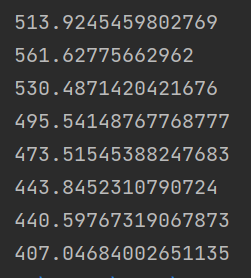
→ k=3일 때 가장 높은 값을 가지는 것을 확인
K가 3이 적정함을 알 수 있지만, 해당 스코어만을 가지고 K 값을 확정짓기 어려운 데이터가 있을 수 있음
그럴 때는 분산에 대한 검증뿐 아니라 SSE의 증감을 보는 엘보우 기법도 함께 사용
import matplotlib.pyplot as plt

def elbow(X):
    sse = []
    for i in range(1, 11):
        km = KMeans(n_clusters=i, random_state=1, n_init=10)
        km.fit(X)
        sse.append(km.inertia_)

    plt.plot(range(1, 11), sse, marker='o')
    plt.xlabel('Number of clusters')
    plt.ylabel('SSE')
    plt.show()

elbow(X)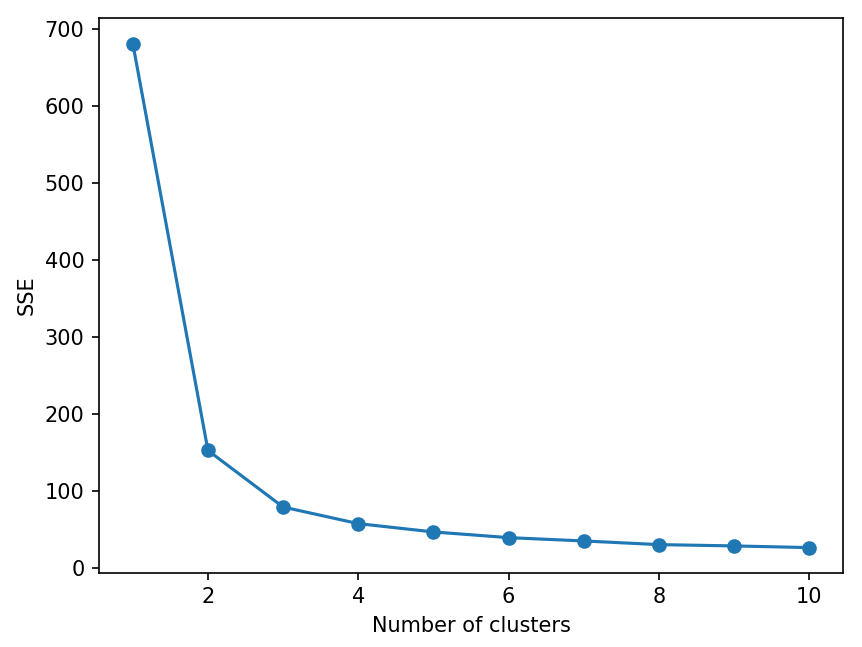
→ 2-3개의 군집이 적절함을 알 수 있음
*k=3으로 최종 군집분석을 수행
km = KMeans(n_clusters=3, random_state=1)
km.fit(X)

new_labels = km.labels_
iris['cluster'] = new_labels
#print(iris.groupby(['cluster']).mean())

import seaborn as sns
import matplotlib.pyplot as plt

sns.pairplot(iris, diag_kind='kde', hue='cluster', corner=True, palette='bright')
plt.show()
*실루엣 계수를 이용한 성능 평가
import numpy as np
import matplotlib.pyplot as plt
from sklearn.cluster import KMeans
from sklearn.datasets import make_blobs
from sklearn.metrics import silhouette_score

X, _ = make_blobs(n_samples=300, centers=4, cluster_std=0.60, random_state=0)

kmeans = KMeans(n_clusters=4, n_init=10)
kmeans.fit(X)
y_kmeans = kmeans.predict(X)

silhouette_avg = silhouette_score(X, y_kmeans)
print(f'Silhouette Score: {silhouette_avg}')

plt.scatter(X[:, 0], X[:, 1], c=y_kmeans, s=50, cmap='viridis')

centers = kmeans.cluster_centers_
plt.scatter(centers[:, 0], centers[:, 1], c='red', s=200, alpha=0.75, marker='x')
plt.title(f'K-means Clustering with Silhouette Score: {silhouette_avg:.2f}')
plt.show()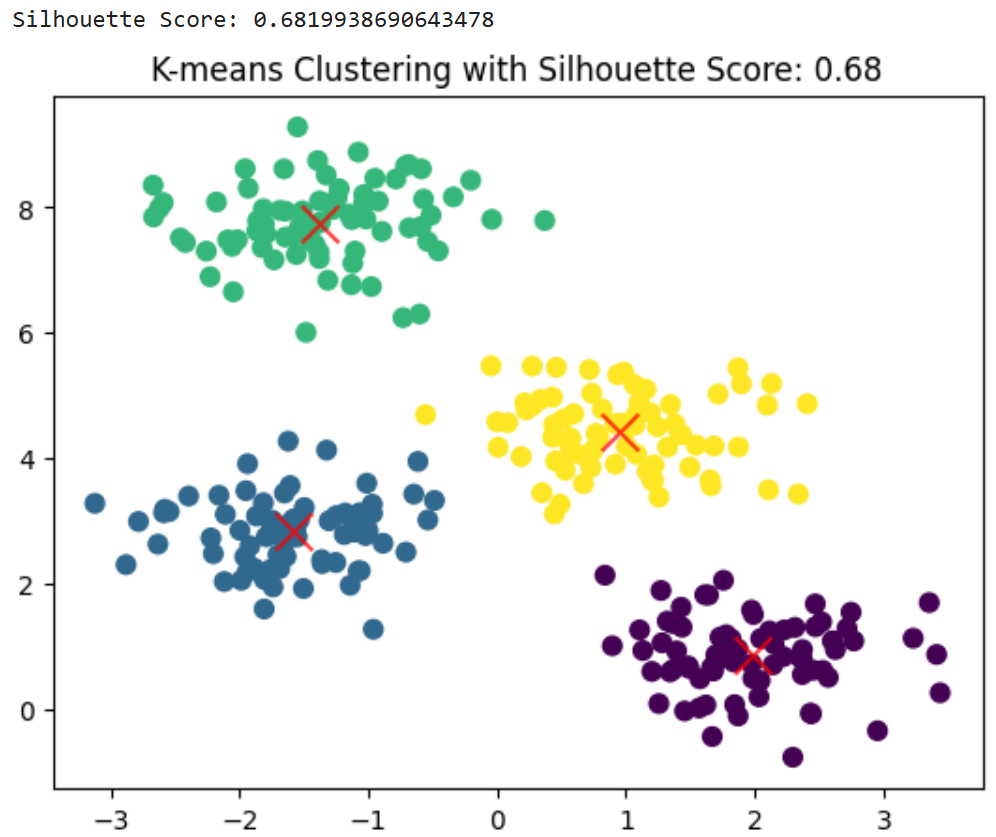
→ 0.6 ~ 0.8: 클러스터링 성능이 우수하며, 데이터가 명확히 클러스터링되어 있다고 볼 수 있음
※ 완벽한 군집화인 경우 1, 군집화가 전혀 이루어지지 않은 경우 -1
*밀도기반 군집분석 (p.343)
비선형과 같은 복잡한 형상을 찾을 수 있으며, 어떤 클래스에도 속하지 않는 노이즈 데이터를 구분할 수 있음
병합 군집이나 K-means 보다 다소 느리며, 데이터 수가 많아질수록 모델링 시간이 증가함
import numpy as np
import matplotlib.pyplot as plt
from sklearn.cluster import DBSCAN
from sklearn.datasets import make_blobs

X, _ = make_blobs(n_samples=300, centers=4, cluster_std=0.50, random_state=0)

dbscan = DBSCAN(eps=0.3, min_samples=5)
y_dbscan = dbscan.fit_predict(X)

plt.scatter(X[:, 0], X[:, 1], c=y_dbscan, s=50, cmap='viridis')
plt.title("DBSCAN Clustering")
plt.show()
*혼합분포 군집분석 (p.346)
– 모형을 기반으로 한 군집분석
– 실생활의 데이터를 적용시키기 위해 발전된 모델 → 정규분포의 형태
*K-means는 원형, DBSCAN은 반달형태 데이터를 잘 군집화
→ 이상값에 민감해서 전처리가 필요함
import pandas as pd
import numpy as np
import sklearn

import seaborn as sns
import matplotlib.pyplot as plt

from sklearn.preprocessing import StandardScaler
from sklearn.mixture import GaussianMixture

iris = pd.read_csv('data/iris.csv')
df = iris.drop('target', axis=1)

scaler = StandardScaler()
df_scaled = scaler.fit_transform(df)

gmm = GaussianMixture(n_components=3)
gmm.fit(df_scaled)
gmm_labels = gmm.predict(df_scaled)
print(gmm_labels)

df['gmm_cluster'] = gmm_labels

clusters = [0, 1, 2]
pd.set_option('display.max_columns', None)
print(df.groupby('gmm_cluster').mean())

sns.pairplot(df, diag_kind='kde', hue='gmm_cluster', corner=True, palette='bright')
plt.show()
→ gmm_labels 변수에 예상되는 군집을 할당
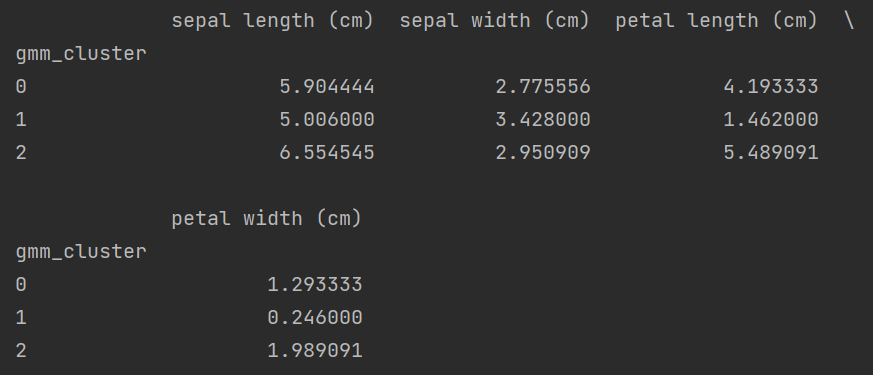

→ 0, 2번 군집에 대해서는 GMM 알고리즘이 더 잘 나눈 것처럼 확인됨
→ 꽃의 종류는 petal width, petal length로 구별된다고 할 수 있음
(0번 군집은 petal width, petal length가 높은 꽃 종류, 1번 군집은 petal width, petal length가 낮은 꽃의 종류)
*SOM(Self-organized map)
데이터 간의 유사성을 유지하면서 데이터를 격자 형태의 맵에 투영하여 시각적으로 표현
MiniSom 객체에는 x와 y 속성이 존재하지 않으므로 이를 직접적으로 참조할 수 없음
대신 SOM 맵의 크기를 som.get_weights()에서 가중치 배열의 형태로 확인할 수 있으며, 이를 통해 시각화 축의 한계 설정
import numpy as np
import pandas as pd
import matplotlib.pyplot as plt
from minisom import MiniSom
from sklearn.preprocessing import MinMaxScaler
from sklearn.metrics import silhouette_score

from sklearn.datasets import load_iris
iris = load_iris()

data = pd.DataFrame(iris.data, columns=iris.feature_names)
target = iris.target

scaler = MinMaxScaler()
data_normalized = scaler.fit_transform(data)

# 3. SOM 모델 생성
# SOM 맵의 크기를 10x10으로 설정하고 학습률과 이웃 반경 설정
som = MiniSom(x=10, y=10, input_len=4, sigma=1.0, learning_rate=0.5)

# 가중치 초기화
som.random_weights_init(data_normalized)

# SOM 학습
print("Training SOM...")
som.train_random(data_normalized, 1000)  # 1000번의 반복 학습

# 4. SOM 결과 시각화
plt.figure(figsize=(7, 7))
plt.title("Self-Organizing Map (SOM) Clustering")

# SOM 맵의 크기 가져오기
som_weights_shape = som.get_weights().shape

for i, x in enumerate(data_normalized):
    w = som.winner(x)  # 각 데이터에 대해 승자 노드를 찾음
    plt.text(w[0] + 0.5, w[1] + 0.5, str(target[i]), color=plt.cm.tab10(target[i]),
             fontdict={'weight': 'bold', 'size': 12})

plt.grid(True)
plt.xlim([0, som_weights_shape[0]])
plt.ylim([0, som_weights_shape[1]])
plt.show()

# 5. 군집 맵 시각화 (U-Matrix)
plt.figure(figsize=(7, 7))
plt.title("SOM Distance Map (U-Matrix)")
distance_map = som.distance_map().T  # 거리 맵
plt.imshow(distance_map, cmap='bone_r')
plt.colorbar(label='Distance')
plt.show()

# 6. 새로운 test 데이터에 대한 예측
# 여기서는 기존 데이터 중 일부를 테스트 데이터로 사용
test_data = data_normalized[:10]  # 첫 10개의 데이터를 테스트로 사용

# 각 테스트 데이터에 대한 승자 노드(BMU) 확인
print("\nPredicted clusters for test data:")
for i, x in enumerate(test_data):
    w = som.winner(x)
    print(f"Test Sample {i+1}: Cluster at {w}")

# 7. 실루엣 점수 계산
# 각 데이터에 대한 승자 노드 인덱스(군집)를 할당
som_clusters = np.array([som.winner(x) for x in data_normalized])
# 군집을 1차원 배열로 변환 (행렬 좌표를 하나의 레이블로 변환)
som_cluster_labels = np.array([w[0] * 10 + w[1] for w in som_clusters])

# 실루엣 점수 계산 (실루엣 점수는 1에 가까울수록 좋음)
silhouette_avg = silhouette_score(data_normalized, som_cluster_labels)
print(f"\nSilhouette Score: {silhouette_avg:.4f}")
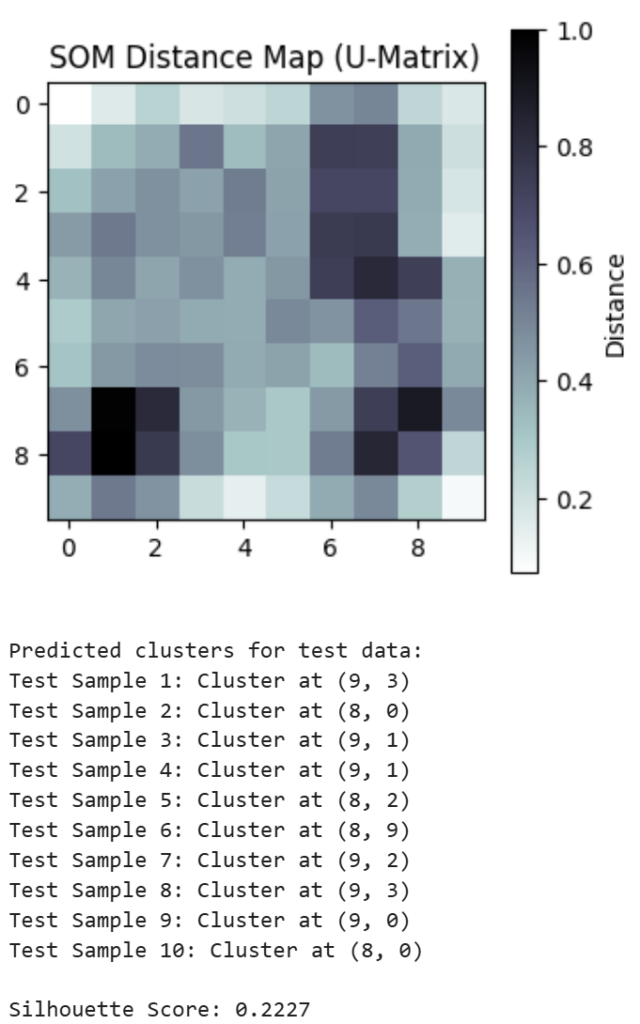

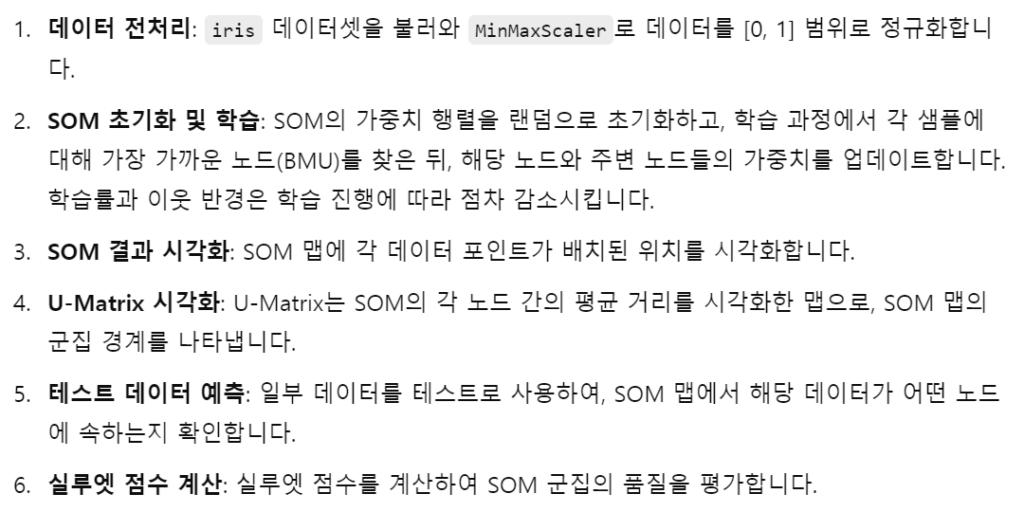
*minisom 이용하지 않은 예제
import numpy as np
import pandas as pd
import matplotlib.pyplot as plt
from sklearn.preprocessing import MinMaxScaler
from sklearn.metrics import silhouette_score
from sklearn.datasets import load_iris

iris = load_iris()
data = pd.DataFrame(iris.data, columns=iris.feature_names)
target = iris.target

scaler = MinMaxScaler()
data_normalized = scaler.fit_transform(data)

# 2. SOM 파라미터 설정
som_grid_rows, som_grid_cols = 10, 10  # SOM 맵의 크기
input_dim = data_normalized.shape[1]  # 입력 데이터 차원 (4차원: iris의 feature 수)
learning_rate = 0.5  # 초기 학습률
num_iterations = 1000  # 반복 횟수

# 3. SOM 가중치 초기화
som_weights = np.random.random((som_grid_rows, som_grid_cols, input_dim))

# 4. 거리 계산 함수 (유클리디안 거리)
def euclidean_distance(x, y):
    return np.sqrt(np.sum((x - y) ** 2))

# 5. SOM 학습 과정
for iteration in range(num_iterations):
    # 학습률과 이웃반경 감소
    decay_factor = 1 - (iteration / num_iterations)
    lr = learning_rate * decay_factor
    radius = max(som_grid_rows, som_grid_cols) * decay_factor

    # 데이터에서 무작위로 하나의 샘플 선택
    sample_idx = np.random.randint(0, data_normalized.shape[0])
    sample = data_normalized[sample_idx]

    # 승자 노드(BMU) 찾기
    bmu_idx = None
    min_dist = float('inf')
    for i in range(som_grid_rows):
        for j in range(som_grid_cols):
            dist = euclidean_distance(som_weights[i, j], sample)
            if dist < min_dist:
                min_dist = dist
                bmu_idx = (i, j)

    # 승자 노드 및 이웃 노드 업데이트
    for i in range(som_grid_rows):
        for j in range(som_grid_cols):
            dist_to_bmu = euclidean_distance(np.array([i, j]), np.array(bmu_idx))
            if dist_to_bmu < radius:
                influence = np.exp(-(dist_to_bmu ** 2) / (2 * (radius ** 2)))
                som_weights[i, j] += influence * lr * (sample - som_weights[i, j])

# 6. SOM 결과 시각화
plt.figure(figsize=(7, 7))
plt.title("Self-Organizing Map (SOM) Clustering")

for i, x in enumerate(data_normalized):
    bmu_idx = None
    min_dist = float('inf')
    for row in range(som_grid_rows):
        for col in range(som_grid_cols):
            dist = euclidean_distance(som_weights[row, col], x)
            if dist < min_dist:
                min_dist = dist
                bmu_idx = (row, col)
    plt.text(bmu_idx[0] + 0.5, bmu_idx[1] + 0.5, str(target[i]), color=plt.cm.tab10(target[i]),
             fontdict={'weight': 'bold', 'size': 12})

plt.xlim([0, som_grid_rows])
plt.ylim([0, som_grid_cols])
plt.grid(True)
plt.show()

# 7. 군집 맵 시각화 (U-Matrix)
distance_map = np.zeros((som_grid_rows, som_grid_cols))
for i in range(som_grid_rows):
    for j in range(som_grid_cols):
        neighbors = []
        if i > 0:
            neighbors.append(som_weights[i-1, j])
        if i < som_grid_rows - 1:
            neighbors.append(som_weights[i+1, j])
        if j > 0:
            neighbors.append(som_weights[i, j-1])
        if j < som_grid_cols - 1:
            neighbors.append(som_weights[i, j+1])
        distances = [euclidean_distance(som_weights[i, j], neighbor) for neighbor in neighbors]
        distance_map[i, j] = np.mean(distances)

plt.figure(figsize=(7, 7))
plt.title("SOM Distance Map (U-Matrix)")
plt.imshow(distance_map, cmap='bone_r')
plt.colorbar(label='Distance')
plt.show()

# 8. 새로운 test 데이터에 대한 예측
test_data = data_normalized[:10]  # 첫 10개의 데이터를 테스트로 사용

print("\nPredicted clusters for test data:")
for i, x in enumerate(test_data):
    bmu_idx = None
    min_dist = float('inf')
    for row in range(som_grid_rows):
        for col in range(som_grid_cols):
            dist = euclidean_distance(som_weights[row, col], x)
            if dist < min_dist:
                min_dist = dist
                bmu_idx = (row, col)
    print(f"Test Sample {i+1}: Cluster at {bmu_idx}")

# 9. 실루엣 점수 계산
som_clusters = np.array([np.argmin([[euclidean_distance(som_weights[i, j], x)
                                     for j in range(som_grid_cols)]
                                    for i in range(som_grid_rows)]) for x in data_normalized])

# 실루엣 점수 계산
silhouette_avg = silhouette_score(data_normalized, som_clusters)
print(f"\nSilhouette Score: {silhouette_avg:.4f}")

*응집도, 분리도 구하기
import numpy as np
from sklearn.cluster import KMeans
from sklearn.datasets import make_blobs
from scipy.spatial.distance import cdist

def cohesion(X, labels):
    unique_clusters = np.unique(labels)
    cohesion_sum = 0
    for cluster in unique_clusters:
        cluster_points = X[labels == cluster]
        if len(cluster_points) > 1:
            distances = cdist(cluster_points, cluster_points)
            cohesion_sum += np.sum(distances) / 2  # 대칭행렬이므로 2로 나눔
    return cohesion_sum / len(X)

def separation(X, labels):
    unique_clusters = np.unique(labels)
    centroids = [np.mean(X[labels == cluster], axis=0) for cluster in unique_clusters]
    distances = cdist(centroids, centroids)
    return np.sum(distances) / 2  # 대칭행렬이므로 2로 나눔

def dunn_index(X, labels):
    intra_cluster_distance = cohesion(X, labels)   # 응집도
    inter_cluster_distance = separation(X, labels) # 분리도
    return inter_cluster_distance / intra_cluster_distance

X, _ = make_blobs(n_samples=300, centers=4, cluster_std=0.60, random_state=0)

kmeans = KMeans(n_clusters=4, n_init=10)
kmeans.fit(X)
labels = kmeans.labels_

cohesion_value = cohesion(X, labels)
separation_value = separation(X, labels)
dunn_value = dunn_index(X, labels)

print(f'Cohesion (응집도): {cohesion_value}')
print(f'Separation (분리도): {separation_value}')
print(f'Dunn Index: {dunn_value}')
→ 이 경우 응집도가 분리도보다 더 큰데, 이는 클러스터 내 데이터 포인트들이 비교적 잘 응집되어 있지만, 클러스터 간의 거리가 조금 가깝게 형성되었을 수 있음을 의미
→ 최적의 군집을 찾기 위해 eps나 n_clusters 등의 하이퍼파라미터를 조정하거나 다른 클러스터링 방법 시도
*n_clusters=3으로 설정했을 때,


※ 응집도가 낮을수록 같은 클러스터 내의 데이터들이 더 가깝게 모여 있다는 것, 클러스터링의 질이 좋다고 할 수 있음
※ 분리도가 클수록 다른 클러스터와 명확하게 분리되어 군집화가 잘 된 것
※ Dunn Index 값이 0과 1 사이에서 클수록 클러스터링 성능이 더 좋다고 할 수 있음
*다이아나 분석

import numpy as np
import matplotlib.pyplot as plt
from scipy.spatial.distance import cdist

X = np.array([
    [1, 2], [2, 1], [2, 2],
    [8, 8], [9, 8], [8, 9]
])

def diana(X, max_clusters=2):
    clusters = [list(range(len(X)))]  # 전체 데이터 인덱스로 시작

    while len(clusters) < max_clusters:
        # 1. 가장 큰 클러스터 선택
        largest_cluster = max(clusters, key=len)
        clusters.remove(largest_cluster)

        # 2. 해당 클러스터의 거리 계산
        cluster_points = X[largest_cluster]
        dist_matrix = cdist(cluster_points, cluster_points)

        # 3. 가장 멀리 떨어진 점을 기준으로 분리 시작
        seed_idx = np.argmax(np.sum(dist_matrix, axis=1))
        seed_point = largest_cluster[seed_idx]

        new_cluster = [seed_point]
        old_cluster = [i for i in largest_cluster if i != seed_point]

        # 4. 거리 기반으로 분리 (멀면 분리)
        for i in old_cluster[:]:
            d_to_new = np.mean(cdist([X[i]], X[new_cluster]))
            d_to_old = np.mean(cdist([X[i]], X[[j for j in old_cluster if j != i]])) if len(old_cluster) > 1 else 0
            if d_to_new < d_to_old:
                new_cluster.append(i)
                old_cluster.remove(i)

        clusters.append(old_cluster)
        clusters.append(new_cluster)

    return clusters

clusters = diana(X, max_clusters=2)

colors = ['red', 'blue', 'green', 'purple']
for i, cluster in enumerate(clusters):
    pts = X[cluster]
    plt.scatter(pts[:, 0], pts[:, 1], label=f"Cluster {i+1}", color=colors[i])
plt.title("DIANA Clustering (Custom Python)")
plt.legend()
plt.grid(True)
plt.show()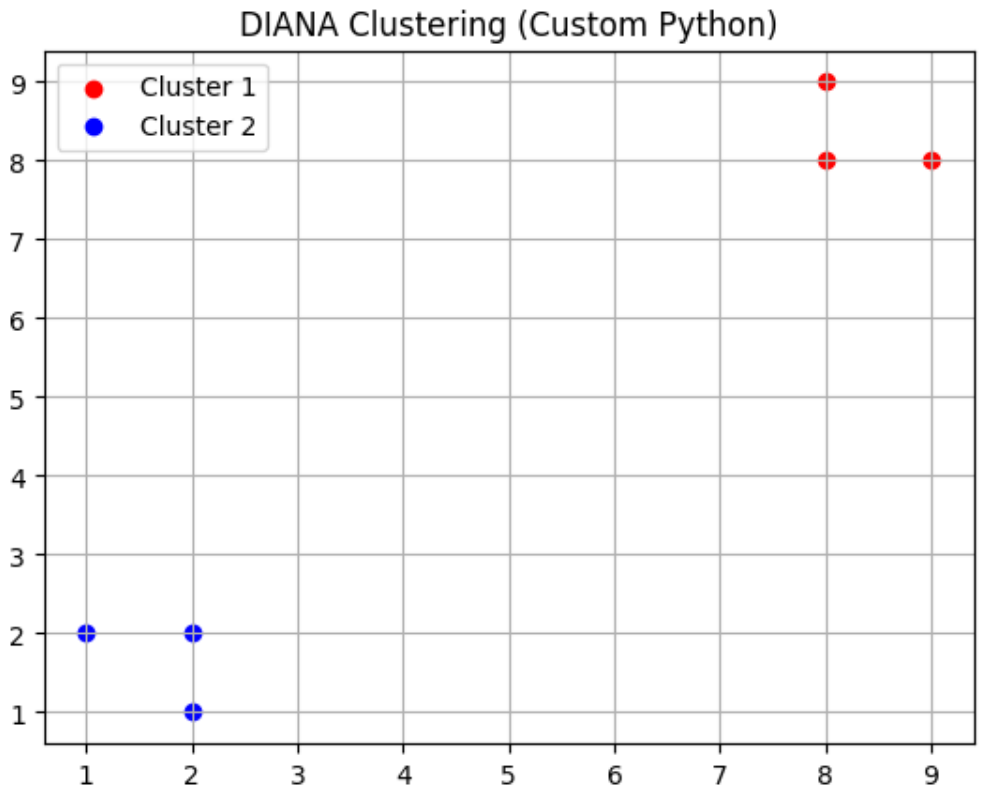
import numpy as np
import matplotlib.pyplot as plt
from scipy.spatial.distance import cdist
from sklearn.datasets import make_blobs

X, _ = make_blobs(n_samples=30, centers=3, cluster_std=0.8, random_state=42)

def diana(X, max_clusters=3):
    clusters = [list(range(len(X)))]
    while len(clusters) < max_clusters:
        largest_cluster = max(clusters, key=len)
        clusters.remove(largest_cluster)

        cluster_points = X[largest_cluster]
        dist_matrix = cdist(cluster_points, cluster_points)
        seed_idx = np.argmax(np.sum(dist_matrix, axis=1))
        seed_point = largest_cluster[seed_idx]

        new_cluster = [seed_point]
        old_cluster = [i for i in largest_cluster if i != seed_point]

        for i in old_cluster[:]:
            d_to_new = np.mean(cdist([X[i]], X[new_cluster]))
            d_to_old = np.mean(cdist([X[i]], X[[j for j in old_cluster if j != i]])) if len(old_cluster) > 1 else 0
            if d_to_new < d_to_old:
                new_cluster.append(i)
                old_cluster.remove(i)

        clusters.append(old_cluster)
        clusters.append(new_cluster)
    return clusters

clusters = diana(X, max_clusters=3)

colors = ['red', 'blue', 'green', 'purple', 'orange']
plt.figure(figsize=(8, 5))
for i, cluster in enumerate(clusters):
    pts = X[cluster]
    plt.scatter(pts[:, 0], pts[:, 1], label=f"Cluster {i+1}", color=colors[i])
plt.title("DIANA Clustering on Test Data (make_blobs)")
plt.xlabel("Feature 1")
plt.ylabel("Feature 2")
plt.legend()
plt.grid(True)
plt.show()
*군집화 + 예측
import numpy as np
from sklearn.datasets import make_blobs
from sklearn.ensemble import RandomForestClassifier
from sklearn.metrics import classification_report
from scipy.spatial.distance import pdist, squareform

# 1. 데이터 생성
X, _ = make_blobs(n_samples=100, centers=3, cluster_std=0.6, random_state=42)

# 2. DIANA 스타일 분할 - 가장 먼 두 점 기준으로 군집 나누기 (간단 예시)
def simple_diana(X):
    distance_matrix = squareform(pdist(X))
    i, j = np.unravel_index(np.argmax(distance_matrix), distance_matrix.shape)
    center1 = X[i]
    center2 = X[j]

    labels = []
    for x in X:
        d1 = np.linalg.norm(x - center1)
        d2 = np.linalg.norm(x - center2)
        labels.append(0 if d1 < d2 else 1)

    return np.array(labels)

cluster_labels = simple_diana(X)

# 3. 분류기 학습용으로 사용
model = RandomForestClassifier()
model.fit(X, cluster_labels)

# 4. 새 데이터로 예측
new_data = np.array([[2, 2], [8, 4]])
predicted_clusters = model.predict(new_data)

print("새 데이터에 대한 예측 군집:", predicted_clusters)'데이터 분석 > ADP 자격증 공부' 카테고리의 다른 글
| (파이썬 한권으로 끝내기) 시계열분석 (0) | 2026.04.06 |
|---|---|
| (파이썬 한권으로 끝내기) 연관분석 (0) | 2026.04.06 |
| (파이썬 한권으로 끝내기) 상관계수, 선형 회귀분석, 다중 회귀, 다중공선성, 변수선택법(전진선택법, 후진제거법, 단계선택법) (0) | 2026.04.05 |
| [ADP 필기] 비정형 데이터마이닝 – 텍스트마이닝, 사회연결망 분석 (0) | 2026.04.05 |
| [ADP 필기] 연관분석 (0) | 2026.04.05 |