*파이썬 비정형 텍스트마이닝 1편 – 영문 전처리, 워드클라우드
from pandas import DataFrame, read_table
import re

from nltk.corpus import stopwords
from nltk.tag import pos_tag
import nltk
nltk.download('stopwords')
nltk.download('averaged_perceptron_tagger')

from nltk.tokenize import WordPunctTokenizer
from nltk.tokenize import RegexpTokenizer

from collections import Counter

import matplotlib.pyplot as plt
from wordcloud import WordCloud
from IPython.display import Image as image


fi = open('기생충리뷰_eng.txt', mode='r', encoding='utf-8')
review = fi.read()

# 1. 특수 문자 제거
text = re.sub('[^A-Za-z가-힣\\s]', ' ', review)  # 숫자는 0-9 추가
print(text)

# 2. 토큰화
#tokenizer = RegexpTokenizer("[\w']+")
tokenizer = WordPunctTokenizer()
tokens = tokenizer.tokenize(text)
print(tokens)

# 3. stopwords 제거
clear_tokens = [each_word for each_word in tokens if each_word not in stopwords.words()]
print(clear_tokens)

# 4. 단어 사전 생성
count_tokens = Counter(clear_tokens)
count_tokens = count_tokens.most_common()
dictionary_text = dict(count_tokens)
print(dictionary_text)

# 5. 형태소 분석
pos_text = pos_tag(clear_tokens)
print(pos_text)

for word in pos_text: #명사
    if word[1].startswith('N'):  # 형용사 J, 동사 V, 부사 R
        print(word[0])

# 6. 빈도수 상위 키워드 막대 그래프
tdm = DataFrame.from_dict(dictionary_text, orient='index')
plt.rcParams['font.family'] = 'Malgun Gothic'
tdm.plot.bar()

# 7. 워드클라우드 생성
wordcloud = WordCloud(font_path='data/KoPubDotumLight.ttf', relative_scaling = 0.2, background_color = 'black').generate_from_frequencies(dictionary_text)
plt.figure(figsize=(10,4))
plt.imshow(wordcloud)
plt.axis('on')
plt.show()

wordcloud.to_file('기생충wc.png')
image('기생충wc.png')

#fo = open('data/기생충리뷰_수정.txt', mode='w')
#fo.write(text)
* 한글깨짐을 위해 폰트 경로를 명시함
(그 전에 폰트 관련 오류 났는데, pip install –upgrade Pillow 명령어로 해결)

한국어는 KoNLPy 패키지를 이용하는걸 추천, but 자바 뭐시기 설정이 필요하니 패스~
*DataFrame으로 처리하는 버전 (한국어 처리도 가능)
import pandas as pd
import re
from nltk.corpus import stopwords
from nltk.tokenize import WordPunctTokenizer
from nltk.tag import pos_tag
from collections import Counter
import matplotlib.pyplot as plt
from wordcloud import WordCloud
from IPython.display import Image as image
import nltk

# NLTK 리소스 다운로드
nltk.download('stopwords')
nltk.download('averaged_perceptron_tagger')
#nltk.download('all')

# 한국어 불용어는 직접 정의
korean_stopwords = set("""#이 그 저 것 들 에 게 로 의 에서 그리고 그러나 하지만
등 과 또한 는 은 이가 도 을 를 과 및 하고
""".split())

# 1. 파일 열기 및 읽기
fi = open('기생충리뷰_eng.txt', mode='r', encoding='utf-8')
review = fi.read()

# 2. 문단별로 분리 (두 개 이상의 줄바꿈으로 분리)
paragraphs = review.split('\n\n')

# 3. 문단 데이터를 DataFrame으로 변환
df = pd.DataFrame(paragraphs, columns=['Paragraph'])

# DataFrame에서 문단별로 텍스트 처리를 수행
def process_text(text):

    # 1. 특수 문자 제거
    cleaned_text = re.sub('[^A-Za-z가-힣\\s]', ' ', text)  # 숫자는 0-9 추가 가능

    # 2. 토큰화
    tokenizer = WordPunctTokenizer()
    tokens = tokenizer.tokenize(cleaned_text)

    # 3. stopwords 제거(영어와 한국어 모두 적용)
    stop_words = set(nltk.corpus.stopwords.words('english')).union(korean_stopwords)
    clear_tokens = [word for word in tokens if word.lower() not in stop_words]

    # 4. 단어 사전 생성
    count_tokens = Counter(clear_tokens)
    dictionary_text = dict(count_tokens.most_common())

    # 5. 형태소 분석
    pos_text = pos_tag(clear_tokens)

    # 명사만 추출 (또는 필요에 따라 다른 품사도 추가 가능)
    nouns = [word[0] for word in pos_text if word[1].startswith('N')]
    #2 nouns = [word for word, tag in pos_text if tag == 'Noun']

    return {
        'cleaned_text': cleaned_text,
        'tokens': tokens,
        'clear_tokens': clear_tokens,
        'dictionary_text': dictionary_text,
        'nouns': nouns
    }

# DataFrame의 각 문단에 대해 텍스트 처리 적용
df['processed'] = df['Paragraph'].apply(process_text)

# 6. 빈도수 상위 키워드 막대 그래프 (전체 문단에서 추출된 데이터 합침)
all_dictionary = Counter()
for dictionary in df['processed'].apply(lambda x: x['dictionary_text']):
    all_dictionary.update(dictionary)
#2 all_nouns = [noun for nouns_list in df['nouns'] for noun in nouns_list]
#2 all_dictionary = Counter(all_nouns)  # 한 번에 전체 명사 빈도 계산

# DataFrame으로 변환 후 막대 그래프
tdm = pd.DataFrame.from_dict(all_dictionary, orient='index')
plt.rcParams['font.family'] = 'Malgun Gothic'
tdm.plot.bar(figsize=(10, 6))
plt.title('빈도수 상위 키워드')
plt.show()

# 7. 워드클라우드 생성
wordcloud = WordCloud(font_path='data/KoPubDotumLight.ttf', relative_scaling=0.2, background_color='black').generate_from_frequencies(all_dictionary)
plt.figure(figsize=(10, 4))
plt.imshow(wordcloud)
plt.axis('off')
plt.show()

# 워드클라우드 이미지 저장
wordcloud.to_file('기생충wc.png')
image('기생충wc.png')

# 텍스트 저장
#df['Paragraph'].to_csv('output.txt', index=False, header=False, sep='\n', encoding='utf-8')
#with open('output.txt', mode='w', encoding='utf-8') as file:
#    for paragraph in df['Paragraph']:
#        file.write(paragraph + '\n')  # 문단마다 줄바꿈 추가
*형태소 분석
from konlpy.tag import Okt

# Okt 형태소 분석기 선언
okt = Okt()

# 분석할 텍스트
text = "기생충은 한국 영화 역사상 중요한 작품입니다."

# 형태소 분석
morphs = okt.morphs(text)
print("형태소:", morphs)

# 품사 태깅
pos = okt.pos(text)
print("품사 태깅:", pos)

# 명사 추출
nouns = okt.nouns(text)
print("명사:", nouns)
*한글 TF-IDF 적용하기
from konlpy.tag import Okt

okt = Okt()

def tokenize(text):
    return okt.morphs(text, stem=True)

vectorizer = TfidfVectorizer(tokenizer=tokenize, max_features=1000)
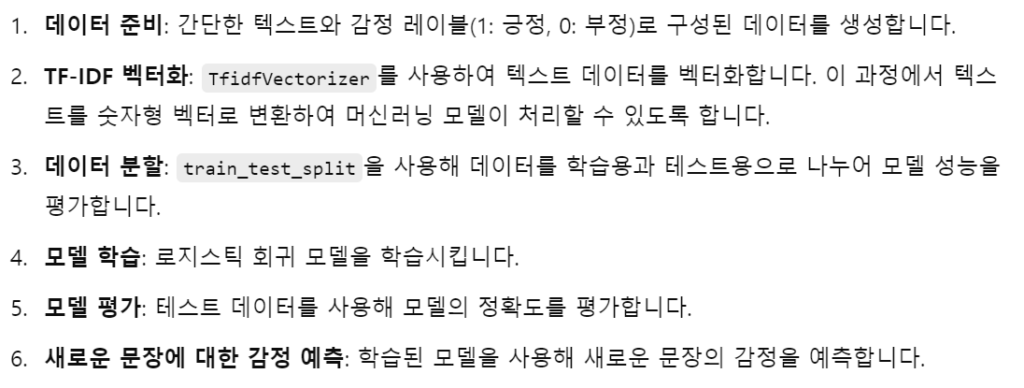
*감정 분석 예제 코드
import pandas as pd
from sklearn.feature_extraction.text import TfidfVectorizer
from sklearn.model_selection import train_test_split
from sklearn.linear_model import LogisticRegression
from sklearn.metrics import accuracy_score

# 예제 데이터 준비 (긍정/부정 레이블이 있는 간단한 텍스트 데이터)
data = {'Text': ["I love this product!", "This is the worst thing I have ever bought.",
                 "Absolutely fantastic! Highly recommend it.", "Not good at all.",
                 "I'm very satisfied with this.", "This is a complete waste of money."],
        'Sentiment': [1, 0, 1, 0, 1, 0]}  # 1: 긍정, 0: 부정

df = pd.DataFrame(data)

# 텍스트 데이터를 벡터화 (TF-IDF 사용)
vectorizer = TfidfVectorizer(max_features=1000)
X = vectorizer.fit_transform(df['Text'])
y = df['Sentiment']

X_train, X_test, y_train, y_test = train_test_split(X, y, test_size=0.2, random_state=42)

# 로지스틱 회귀 모델을 사용하여 학습
model = LogisticRegression()
model.fit(X_train, y_train)

y_pred = model.predict(X_test)

accuracy = accuracy_score(y_test, y_pred)
print(f'Accuracy: {accuracy * 100:.2f}%')

# 새로운 문장 감정 분석
new_sentences = ["I really hate this!", "This is the best thing ever."]
new_X = vectorizer.transform(new_sentences)
new_predictions = model.predict(new_X)

for sentence, prediction in zip(new_sentences, new_predictions):
    sentiment = "Positive" if prediction == 1 else "Negative"
    print(f'Text: {sentence} -> Sentiment: {sentiment}')
*Word2Vec + 군집화
from gensim.models import Word2Vec
from sklearn.cluster import KMeans
import matplotlib.pyplot as plt
import numpy as np

sentences = [
    ['dog', 'barks', 'cat', 'meows', 'cow', 'moos'],
    ['car', 'drives', 'bike', 'rides', 'train', 'runs'],
    ['apple', 'fruit', 'banana', 'orange', 'grape'],
    ['computer', 'keyboard', 'mouse', 'monitor'],
    ['king', 'queen', 'man', 'woman', 'prince', 'princess']
]

model = Word2Vec(sentences, vector_size=50, window=2, min_count=1, sg=1)

words = list(model.wv.index_to_key)
word_vectors = np.array([model.wv[word] for word in words])   # 단어 벡터 추출

k = 4
kmeans = KMeans(n_clusters=k, random_state=42)
kmeans.fit(word_vectors)
labels = kmeans.labels_

# 클러스터별 단어 출력
from collections import defaultdict
clustered_words = defaultdict(list)
for word, label in zip(words, labels):
    clustered_words[label].append(word)

print("📦 클러스터별 단어 그룹:")
for cluster_id, word_list in clustered_words.items():
    print(f"Cluster {cluster_id}: {', '.join(word_list)}")

from sklearn.manifold import TSNE

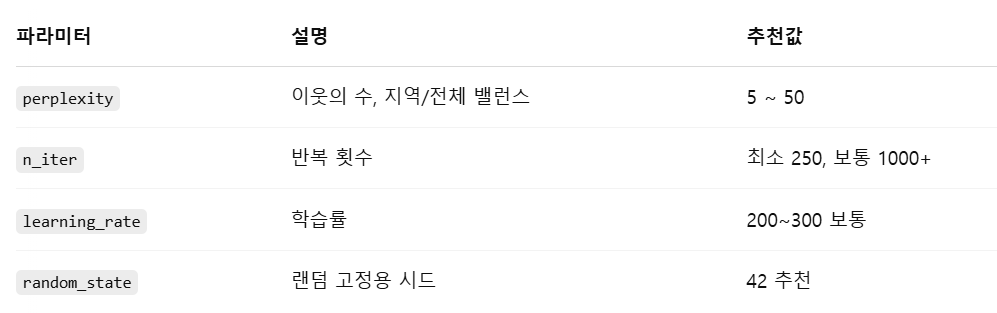
# t-SNE: 고차원 데이터를 저차원(보통 2D 또는 3D)으로 시각화하는 데 널리 쓰이는 차원 축소 기법 - 비선형 축소
tsne = TSNE(n_components=2, random_state=42, perplexity=5)
reduced = tsne.fit_transform(word_vectors)

plt.figure(figsize=(10, 6))
for i, word in enumerate(words):
    plt.scatter(reduced[i, 0], reduced[i, 1], c=f"C{labels[i]}")
    plt.text(reduced[i, 0]+0.01, reduced[i, 1]+0.01, word, fontsize=9)
plt.title("Word2Vec Clusters (TSNE)")
plt.grid(True)
plt.show()
*TSNE 함수 파라미터

*Word2Vec + SVM
from gensim.models import Word2Vec
from sklearn.svm import SVC
from sklearn.metrics import classification_report
from sklearn.model_selection import train_test_split
import numpy as np
import nltk
nltk.download('punkt')
from nltk.tokenize import word_tokenize

texts = [
    "I love this product",      # 긍정
    "This is the best thing",   # 긍정
    "Absolutely wonderful",     # 긍정
    "I hate it",                # 부정
    "This is terrible",         # 부정
    "Not good at all"           # 부정
]
labels = [1, 1, 1, 0, 0, 0]  # 1 = 긍정, 0 = 부정

tokenized = [word_tokenize(sent.lower()) for sent in texts]

w2v_model = Word2Vec(sentences=tokenized, vector_size=50, window=2, min_count=1, sg=1)

# 문장 벡터 생성 함수: 단어 벡터의 평균
def get_sentence_vector(tokens):
    vectors = [w2v_model.wv[word] for word in tokens if word in w2v_model.wv]
    return np.mean(vectors, axis=0) if vectors else np.zeros(w2v_model.vector_size)

# 전체 문장을 벡터로 변환
X = np.array([get_sentence_vector(tokens) for tokens in tokenized])
y = np.array(labels)

X_train, X_test, y_train, y_test = train_test_split(X, y, test_size=0.33, random_state=42, stratify=y)

clf = SVC(kernel='linear')
clf.fit(X_train, y_train)

y_pred = clf.predict(X_test)
print("분류 성능 평가:\n", classification_report(y_test, y_pred))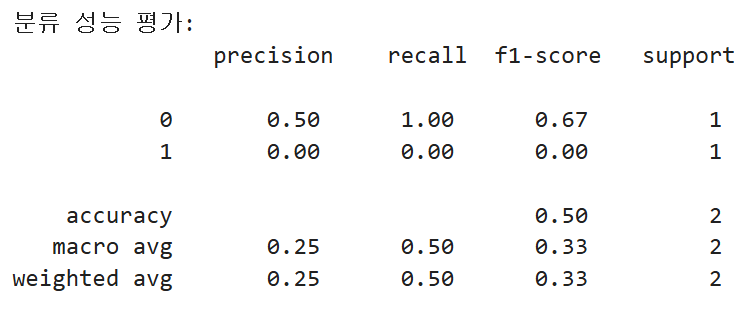
→ 데이터가 적어서 stratify=y 적용시켰더니 결과가 잘 나옴
→ Pandas 데이터프레임일 때
import pandas as pd
import numpy as np
from gensim.models import Word2Vec
from sklearn.svm import SVC
from sklearn.metrics import classification_report
from sklearn.model_selection import train_test_split
import nltk
nltk.download('punkt')
from nltk.tokenize import word_tokenize

data = pd.DataFrame({
    'text': [
        "I love this product",         # 긍정
        "This is the best thing",      # 긍정
        "Absolutely wonderful",        # 긍정
        "I hate it",                   # 부정
        "This is terrible",            # 부정
        "Not good at all"              # 부정
    ],
    'label': [1, 1, 1, 0, 0, 0]
})

data['tokens'] = data['text'].apply(lambda x: word_tokenize(x.lower()))
w2v_model = Word2Vec(sentences=data['tokens'], vector_size=50, window=2, min_count=1, sg=1)

def get_sentence_vector(tokens):
    vectors = [w2v_model.wv[word] for word in tokens if word in w2v_model.wv]
    return np.mean(vectors, axis=0) if vectors else np.zeros(w2v_model.vector_size)

data['vector'] = data['tokens'].apply(get_sentence_vector)

X = np.stack(data['vector'].values)
y = data['label'].values

X_train, X_test, y_train, y_test = train_test_split(X, y, test_size=0.33, random_state=42, stratify=y)

clf = SVC(kernel='linear')
clf.fit(X_train, y_train)
y_pred = clf.predict(X_test)

print("📊 분류 성능 평가:\n")
print(classification_report(y_test, y_pred, zero_division=0))'데이터 분석 > ADP 자격증 공부' 카테고리의 다른 글
| (파이썬 한권으로 끝내기) 모의고사 제3회 소스코드, 샘플 데이터 (0) | 2026.04.06 |
|---|---|
| (파이썬 한권으로 끝내기) 모의고사 제2회 소스코드, 샘플 데이터 (0) | 2026.04.06 |
| (파이썬 한권으로 끝내기) 모의고사 제1회 소스코드, 샘플 데이터 (0) | 2026.04.06 |
| (파이썬 한권으로 끝내기) 시계열분석 (0) | 2026.04.06 |
| (파이썬 한권으로 끝내기) 연관분석 (0) | 2026.04.06 |