<주피터 노트북 단축키>
- 셀 하단 새로운 셀 생성 : b
- 셀 상단 새로운 셀 생성 : a
- 셀 실행 : shift + enter
- 셀삭제  : dd
- 마크다운 : m

- 패키지 자동완성 : shift
- documents 확인 : ? / 메소드 괄호 열고 shift + tab -> 3번누르면 하단에 나옴
- 라이브러리 하위 메소드 확인 dir
<EDA 기본>
import pandas as pd
import matplotlib.pyplot as plt
import matplotlib.font_manager as fm

import warnings
warnings.filterwarnings("ignore")
pd.set_option('display.max_columns',100)
pd.set_option('display.max_colwidth',400)

#font_prop = fm.FontProperties(fname='/usr/share/fonts/nanum/NanumGothic.ttf')
#plt.rcParams['font.family'] = font_prop.get_name()  # 한글 폰트 설정
plt.rcParams['font.family'] = 'Malgun Gothic'  #plt.rc('font', family='Malgun Gothic')
plt.rcParams['axes.unicode_minus'] = False  # 마이너스 기호 깨짐 방지

df = pd.read_csv('data.csv', encoding='euc-kr', , sep='\t')  # na_values='NA', encoding='utf8', index_col=0
#data.to_csv('result.csv', header=True, index=True, encoding='utf8')

df.select_dtypes(exclude=object).columns  # 수치형 변수를 가진 컬럼을 출력
df.iloc[: , 3].dtype  # 4번째 컬럼 데이터 타입 확인
*select_dtypes() – include/exclude 옵션

*컬럼 별 데이터 출력
df[['date', df.columns[1:][i]]]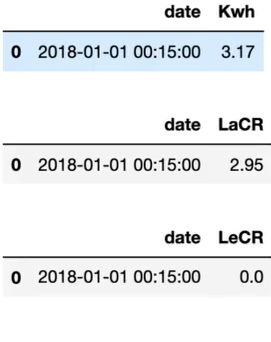
*index를 0부터 정렬
df[df['quantity'] == 3].reset_index(drop=True).head()*데이터 값 설정
df.loc[df.item_name =='Izze','item_name'] = 'Fizzy Lizzy'*조건문 다루기
df[(df['new_price'] <= 9) & (df['item_name'] == 'Chicken Salad Bowl')]len(df[df['new_price'] <= 5])*오름차순/내림차순
df.sort_values('new_price', ascending=False).reset_index(drop=True) # 내림차순 # 오른차순 기본값df.sort_index('new_price')*홀수/짝수 번째 데이터 출력
df.iloc[:, ::2]  # 짝수
df.iloc[:, 1::2]  # 홀수
<sklearn.datasets 관련 함수>
- data: 독립변수(feature)만으로 된 numpy 형태
- target: Label 데이터, 종속변수 값을 numpy 형태로 가짐
- feature_names: Feature 데이터의 이름
- target_names: Label 데이터의 이름
<데이터 탐색>
data = pd.read_csv('data/lotto.csv')
data.describe().T  # mean, std, min, max, 25%, 50%, 75%
data.describe(include='object')
data.head()  # tail()
data.info() # 데이터 타입 확인
data.isnull().sum()  # isna(), notna() 함수도 활용 가능

data['age'].value_counts()  # 요인별 개수 정보    # value_counts().idxmax()
data['age'] = data['age'].fillna(34)
*결측치 제거 > 이상치 제거 > 업/언더 샘플링 > 스케일링 > 데이터 변환 > 8:2 분할 > 학습
<결측값 제거>
→ (수치형) 평균, 중앙값, KNN, (범주형) 최빈값
- 결측값: None, np.NAN, pd.NaT
- 결측치 제거: dropna()
from sklearn.impute import KNNImputer

KNN_data = df.drop(columns=['school', 'sex', 'paid', 'activities'])  # 결측치가 있는 수치형 데이터만 추출

imputer = KNNImputer()
df_filled = imputer.fit_transform(KNN_data)
df_filled = pd.DataFrame(df_filled, columns=KNN_data.columns)
df[KNN_data.columns] = df_filled
from scipy import stats
stats.mode(data).mode[0] # [0]: 최빈값, [1]: 빈도수*중복행 삭제: DataFrame.drop_duplicates()
df.drop_duplicates('item_name')  # 첫번째 케이스만 남기기
df.drop_duplicates('item_name', keep='last') # 마지막 케이스만 남기기*보간법: 시계열 데이터 결측치 대치
※ 옵션: linear, splinear, nearest 등
import pandas as pd
import numpy as np

# 샘플 데이터프레임 생성 (결측값 포함)
data = {'A': [1, 2, np.nan, 4, 5, np.nan, 7],
        'B': [2, 4, 6, np.nan, 10, 12, np.nan]}
df = pd.DataFrame(data)
print(df)

df_linear = df.interpolate(method='linear')
print(df_linear)
*combine_first(): 첫 번째 시리즈에서 결측값이 있는 경우 두 번째 시리즈의 값으로 대체
import pandas as pd
import numpy as np

s1 = pd.Series([1, np.nan, 3, np.nan, 5], index=['a', 'b', 'c', 'd', 'e'])
s2 = pd.Series([10, 20, 30, 40, 50], index=['a', 'b', 'c', 'd', 'e'])

result = s1.combine_first(s2)
<이상치 제거>
– Box Plot → Q1 – 1.5*IQR 미만, Q3 + 1.5*IQR 초과
# IQR 구하기
df['평균 속도'].quantile(0.75) -df['평균 속도'].quantile(0.25)
def outliers_iqr(dt, col):
quartile_1, quartile_3 = np.percentile(dt[col], [25, 75])
iqr = quartile_3 - quartile_1
lower_whis = quartile_1 - (iqr * 1.5)
upper_whis = quartile_3 + (iqr * 1.5)
outliers = dt[(dt[col] > upper_whis) | (dt[col] > lower_whis)]
return outliers[[col]]
outliers = outliers_iqr(wine, 'color_intensity')
drop_outliers = wine.drop(index = outliers.index) # 이상치 제거
wine.loc[outliers.index, 'color_intensity'] = np.NaN # 이상치 대체
※ 여러 데이터를 한 번에 그려주기 위해 데이터 재구조화 – pd.melt(X, var_name=’col’, value_name=’value’)
→ 1% 이하이면 결측치 삭제, 1% 이상이면 결측치 대체
import numpy as np
import pandas as pd

data = {'Feature1': [12, 15, 14, 13, 18, 19, 140],  # 이상치(140)
        'Feature2': [100, 101, 99, 98, 95, 96, 250]}  # 이상치(250)
df = pd.DataFrame(data)

Q1 = df.quantile(0.25)  # 1사분위수
Q3 = df.quantile(0.75)  # 3사분위수
IQR = Q3 - Q1

lower_bound = Q1 - 1.5 * IQR
upper_bound = Q3 + 1.5 * IQR

outliers = (df < lower_bound) | (df > upper_bound)
print(df[outliers])

df_cleaned = df.copy()
for column in df_cleaned.columns:
    median = df_cleaned[column].median()  # 중앙값 계산
    df_cleaned.loc[outliers[column], column] = median  # 이상치 대체

print("\n이상치 대체 후 데이터:")
print(df_cleaned)
<데이터 스케일링>
→ 컬럼 간 데이터 범위가 크게 차이날 경우, 스케일링을 통해 값의 범위를 같게
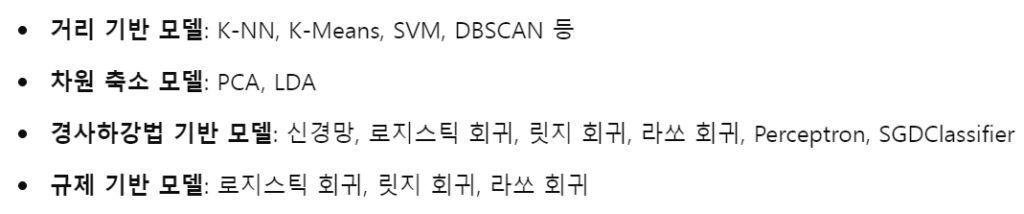
– (분류, PCA) StandardScaler()
※ 평균이 0, 분산이 1인 정규분포로 스케일링
StdScaler = StandardScaler()
StdScaler.fit(X_train)
X_train_sc = StdScaler.transform(X_train)
X_test_sc = StdScaler.transform(X_test)
– (회귀) MinMaxScaler()*, MaxAbsScaler()**
* 0과 1 사이의 값으로 스케일링
** 최대절댓값과 0이 각각 1, 0이 되도록 스케일링하는 정규화 방식으로 모든 값은 -1과 1 사이에 표현
– RobustScaler()
※ 평균과 분산 대신 중앙값(0)과 사분위 값을 활용
– 원본 스케일로 변경하기: scaler.inverse_transform()
<언더 샘플링 / 오버 샘플링>
→ 1,000개 이하는 오버 샘플링 추천
– RandomUnderSampler(sampling_strategy = ‘majority’)
undersample = RandomUnderSampler(sampling_strategy = 'majority')
x_under, y_under = undersample.fit_resample(x, y)
– RandomOverSampler(sampling_strategy = ‘minority’)
– SMOTE(sampling_strategy = ‘ minority ‘)
<차원축소>
1. 설명변수 선택
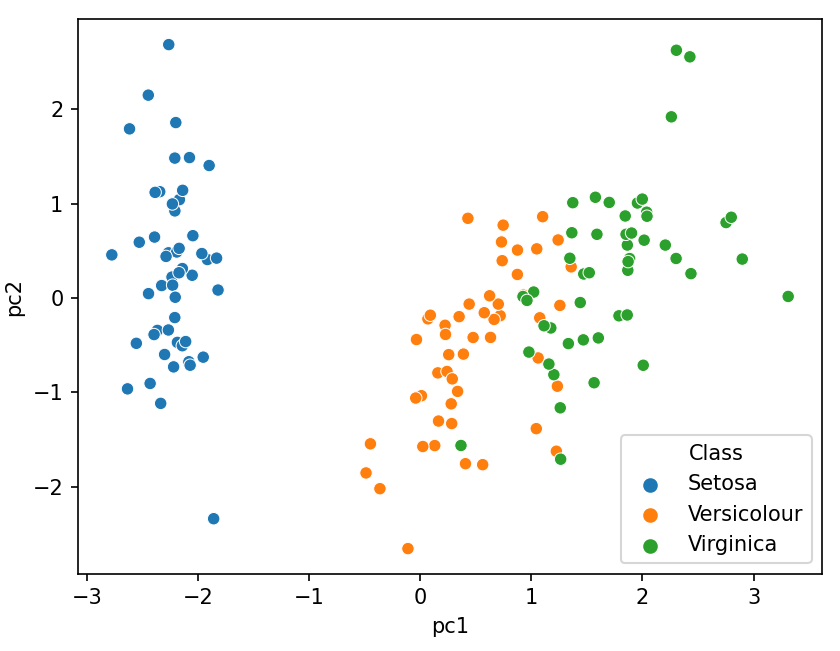
2. 주성분 분석: (수치형 데이터) → 스케일링 → 주성분 추출 → Scree Plot 분석 → 주성분 수 결정
import pandas as pd
import matplotlib.pyplot as plt
import seaborn as sns

from sklearn.datasets import load_iris

from sklearn.preprocessing import StandardScaler
from sklearn.decomposition import PCA

iris = load_iris()
iris = pd.DataFrame(iris.data, columns=iris.feature_names)
iris['Class'] = load_iris().target
iris['Class'] = iris['Class'].map({0: 'Setosa', 1:'Versicolour', 2:'Virginica'})

features = ['수치형 변수1', '수치형 변수2']

x = iris.drop(columns='Class')  # 이상치 제거
x = StandardScaler().fit_transform(x)  # 스케일링
pd.DataFrame(x).head()

pca = PCA(n_components=4)
pca_fit = pca.fit(x)  # 주성분 분석
print('고유 값 : ', pca.singular_values_)
print('분산 설명력 : ', pca.explained_variance_ratio_)

plt.plot(pca.explained_variance_ratio_, 'o-')
plt.show()

pca = PCA(n_components=2)
principalComponents = pca.fit_transform(x)
principal_iris = pd.DataFrame(data = principalComponents, columns=['pc1', 'pc2'])
print(principal_iris.head())

sns.scatterplot(x='pc1', y='pc2', hue=iris.Class, data=principal_iris)
plt.show()
<데이터 변환>
*범주형 변수 변환
→ 더미코딩 – 명목척도, 레이블인코딩 – 이진변수, 서열척도
data['sex'] = data['sex'].replace({'male': 1})
data['sex'] = data['sex'].replace({'female': 2})

data['age_1'] = data['age'].copy()
data['age_1'] = pd.get_dummies(data['age_1'])
iris['Class'] = load_iris().target
iris['Class'] = iris['Class'].map({0: 'Setosa', 1:'Versicolour', 2:'Virginica'})import pandas as pd
from sklearn.preprocessing import LabelEncoder
le = LabelEncoder()
le_dict = {}
for col in df.select_dtypes(include=['object', 'category']):
le = LabelEncoder()
df[col] = le.fit_transform(df[col])
le_dict[col] = le # 나중에 역변환용 저장
#df['컬럼명_복원'] = le_dict['컬럼명'].inverse_transform(df['컬럼명'])※ 컬럼명 변경: X.rename(columns={‘const’: ‘Intercept’}, inplace=True)
– (분류기) object형, string → 0 또는 1, get_dummies
– (군집화) category형 → float형
– (단순선형회귀, 경사하강법) 2차원 array로 변환
X = np.array(data['age'])
X = np.array(data['charges'])
X = X.reshape(1338, 1)
y = y.reshape(1338, 1)
lr = LinearRegression()
lr.fit(X, y)
– (연관분석) Transformation 수행
*수치형 변수 변환
→ 표준화, 최소/최대 스케일링
*원핫인코딩
import pandas as pd
from sklearn.preprocessing import OneHotEncoder

data = {'City': ['Seoul', 'Busan', 'Incheon', 'Seoul', 'Busan'],
        'Temperature': [23, 25, 22, 20, 24]}

df = pd.DataFrame(data)

encoder = OneHotEncoder()
encoded_data = encoder.fit_transform(df[['City']]).toarray()

encoded_df = pd.DataFrame(encoded_data, columns=encoder.categories_[0])
df_encoded = pd.concat([df, encoded_df], axis=1).drop('City', axis=1)
print(df_encoded)
'데이터 분석 > ADP 자격증 공부' 카테고리의 다른 글
| [ADP 실기] (모델평가) 회귀모델, 분류분석모델 성능평가(MAE, MSE, Accuracy, Precision, Recall, F1-score) (0) | 2026.04.05 |
|---|---|
| [ADP 실기] (시각화) 파이썬 그래프 그리기(Boxplot, Scatter, Pairplot, Hitmap 등) (0) | 2026.04.05 |
| [ADP 필기] 분류 알고리즘 – 로지스틱 회귀, 의사결정나무, Naive Bayes, KNN, SVM, 앙상블 (1) | 2026.04.05 |
| [ADP 필기] (머신러닝) 분류 모형 성능 평가 (0) | 2026.04.04 |
| [ADP 필기] 다차원 척도법 (0) | 2026.04.04 |